


edjing Mix - Music DJ app
4.654.37K Reviews
App Specs
- Version
- 7.34.00
- Updated On
- License
- Free
- Downloads
- 100,000,000+
- Developer
- MWM - AI Music and Creative Apps
- Categories
- Music & Audio
- Platform
- Android, iOS
Screenshots
 Analysis by AppCompare
When it comes to DJ apps, there's one name that seems to stand out among the rest: edjing Mix - Music DJ app. As someone who loves experimenting with beats and tracks, I decided to give this app a whirl to see if it lives up to the hype. Spoiler alert: It does.
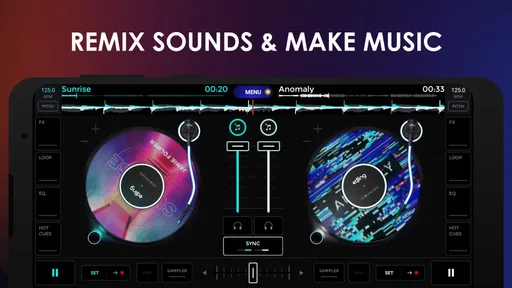
My most useful test of a DJ app is not whether I can make a dramatic transition in seconds; it is whether I can get from a song idea to a listenable mix without losing track of what I am doing. That means choosing music, learning the controls, shaping the change between tracks, and deciding what to do with the result. edjing Mix is aimed at that kind of hands-on experimenting: it puts two-track DJ-style mixing on a phone, so I can try a transition in a spare moment rather than setting up dedicated equipment.
Getting Started with edjing Mix
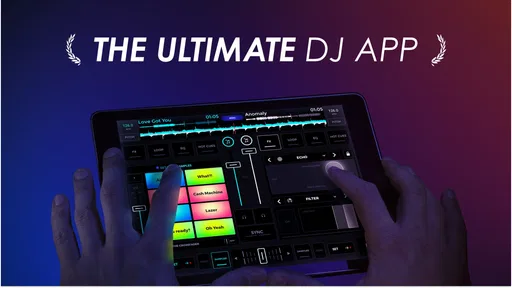
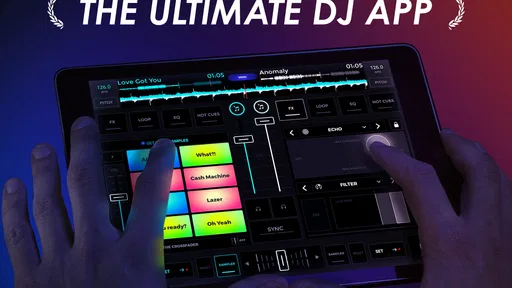
First things first, downloading edjing Mix from the app store was a breeze. It's available on both Android and iOS, which is a huge plus for anyone switching between devices. Once installed, I was greeted with a sleek and intuitive interface. It's clear from the get-go that this app is designed with both beginners and pros in mind.
Guides and Analysis on edjing Mix - Music DJ app
Now, I’ve tried a fair share of DJ apps, and I often find them either too simplistic or overly complicated. But edjing Mix strikes a sweet balance. The tutorial is straightforward, guiding you through the basics without overwhelming you with jargon. Within minutes, I was mixing tracks like a pro—or at least, I felt like one!
That first learning session is best treated as practice, not a performance. I would begin with two familiar songs and focus on a single job: bring the next track in at a sensible moment, then listen for whether the change feels abrupt. It is tempting to tap every effect just because it is available, but that makes it harder to hear what actually improved the blend. A useful habit is to repeat the same transition with one small adjustment at a time. That turns the app into a way to build an ear for timing, not merely a collection of buttons to explore.
Features That Make a Difference
One of the standout features of edjing Mix is its access to a vast music library. You can pull tracks from your local library or stream directly from platforms like SoundCloud and Deezer. For someone who loves variety, this is an absolute game-changer.
In practice, a big choice of sources helps most when I plan the session before I start mixing. I would make a short listening queue around a mood or occasion, rather than search for every next song while one is already playing. That small bit of preparation keeps the creative part moving and makes it easier to notice which tracks sit well together. Source access is convenient, but it should not be confused with a guarantee that every track I want will be available in every situation; having a few suitable tracks ready in my local library is a sensible fallback.
Worth Reading Before You Choose

QuizzLand Review: A Good Fit for Short Trivia Breaks, Not Every Player

Basketball Stars: Multiplayer Is Fast, but Can It Recover When Matches Go Wrong?

WEBTOON Turns Phone Updates Into a Better Reading Routine

Link to Windows Runs on Shared Habits, Not Social Feeds

How Alibaba.com Dominates the B2B Marketplace

Metro's Quiet Rise: Redefining Mobile Communication
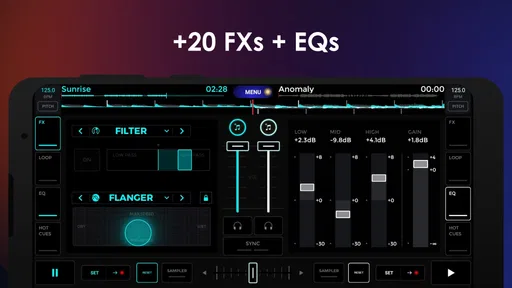
The app also boasts a range of effects and transitions that are super easy to apply. Want to add a little reverb or echo? No problem. With just a few taps, I was able to transform a bland mix into something that could light up a dance floor.
My rule with effects is to use them to support a transition, rather than cover up a transition that does not work. A brief effect can give a change some character, but too many overlapping flourishes can make a phone mix sound cluttered. I get a more controlled result by listening to the tracks without extra treatment first, then adding one effect where it has a clear purpose. If the change sounds better when I remove the effect, that is useful feedback too: the track choice or timing may need attention instead.
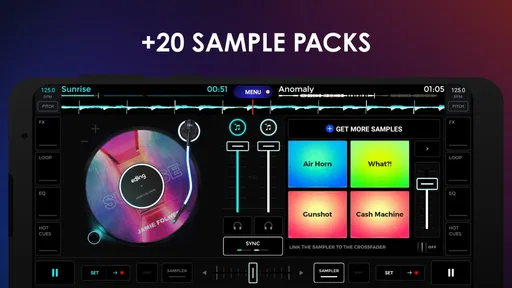
Another feature worth mentioning is the sampler. edjing Mix comes loaded with a variety of built-in samples, and you can easily import your own. This opens up endless possibilities for creativity and personalization in your mixes.
The sampler is most helpful when I think of it as punctuation. A short sound can mark a section change or give a repeated transition a personal touch, but dropping samples over every gap quickly distracts from the songs. For a casual mix, I would choose only a couple that suit the mood and test their placement at low stakes before using them in front of friends. Importing personal sounds also makes the result feel less like a preset demonstration, though it adds another preparation step: the sample needs to be chosen and organized before the moment when I want to use it.
Mixing on the Go
One of the biggest perks of edjing Mix is the ability to DJ anywhere, anytime. Whether you're on a bus or chilling at a friend’s house, you’ve got your entire DJ setup in your pocket. The app’s performance is surprisingly smooth, even on older devices, which is a testament to its efficient design.
A realistic use for that portability is a small gathering where nobody expects a formal DJ set. I can prepare a loose sequence for dinner, a relaxed hangout, or the walk between places, then adjust it to the mood instead of handing over a fixed playlist. That is where a mobile mixing app feels different from an ordinary music player: I am actively deciding how one song gives way to another. I would still plan the session around the setting. A phone is convenient for trying ideas and sharing control informally, but it is not automatically a substitute for a dedicated setup when the sound system, room, or audience calls for more reliable equipment.
While testing it out, I noticed minimal lag and a seamless transition between tracks. This is crucial for live performances, and it’s reassuring to know that edjing Mix can handle the pressure.
For anything that matters beyond a casual test, I would rehearse the exact sequence on the same device and with the same music source I expect to use. A transition that feels easy while exploring can become awkward if I have not chosen the next track or if I am busy searching at the wrong moment. I also find it easier to keep a session tidy by deciding in advance which tracks are likely to follow each other. That does not remove spontaneity; it gives me enough structure to respond without fumbling through a large library.
Why edjing Mix Stands Out
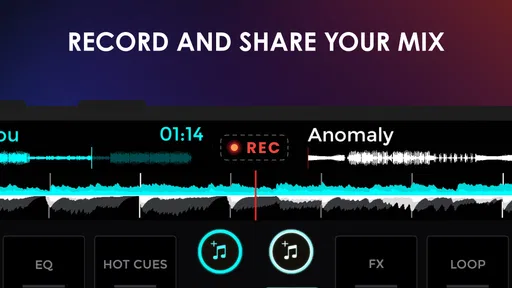
What really sets edjing Mix apart from other DJ apps is its community aspect. It’s not just about mixing music; it’s about sharing your creations with the world. The app integrates social sharing features, allowing you to showcase your mixes on platforms like Facebook and Twitter. It's a fantastic way to get feedback and connect with fellow music enthusiasts.
Sharing also changes how I approach the final few minutes of a session. Before showing a mix to someone else, I would listen through once from beginning to end rather than judge it only by the transitions I enjoyed making. That pass can reveal uneven energy, a sudden change of mood, or a sample that sounded clever in isolation but interrupts the flow. If I am making a mix for a specific friend or occasion, I would prioritize a coherent sequence over showing off every tool. The point is not to make every session public; the social side is an option for people who enjoy exchanging ideas, not a requirement for getting value from the mixing controls.
Moreover, the app regularly updates with new features and improvements, showing a strong commitment from the developers to keep enhancing user experience. It’s always refreshing to see an app that listens to its users and evolves based on feedback.
There is a practical distinction between trying this app and paying for more within it. It is free to download, while in-app purchases range from $0.99 to $114.99 per item, so I would check the specific purchase details before committing rather than assume every tool or add-on is included. The app is developed by MWM - AI Music and Creative Apps, and its long presence in mobile music is reflected in its release date of November 14, 2012. Its current version is 7.29.01, and it is rated for Everyone. Those details make it approachable to explore, but they do not change my basic advice: start with the free experience and decide whether your own mixing habits justify any extra spending.
Where the Flow Can Break
The main trade-off is that a phone-centered workflow asks me to do everything on one small screen. It is handy for spontaneous practice, but searching a large collection, choosing a transition, and monitoring the result can compete for my attention. That is why I would not use a casual, unprepared session as proof that a set is ready for a party. Planning a short run of tracks and testing it beforehand makes the experience much more dependable.
There is also a difference between a DJ-style mix and a finished music production. edjing Mix is a better fit when I want to combine tracks, try effects, and shape a sequence in the moment. If my goal is to compose original songs from scratch, record a carefully arranged studio track, or work with a more elaborate production workflow, I would choose a music-making tool designed for those tasks instead. Likewise, someone who only wants uninterrupted playback may be happier with a conventional music player; the extra controls are useful only if I actually want to make mixing decisions.
Its audience figures are substantial: it has a 4.5 average from around 1.6 million ratings, with more than 100 million installs. That popularity makes it easy to see why curious listeners might try it, but I would base my decision on the kind of session I want to create, not on a large audience alone. Beginners get a gentle way to explore transitions, while more experienced DJs can use it for portable ideas and informal practice. A person who needs a full hardware-oriented performance setup should treat it as a companion rather than a replacement.
Final Thoughts on edjing Mix
After spending some quality time with edjing Mix, I can confidently say it’s one of the best DJ apps out there. Whether you’re a budding DJ looking to hone your skills or a seasoned pro needing a portable solution, this app has something for everyone.
The combination of a user-friendly interface, extensive music library access, and powerful mixing tools makes it a must-have for any music lover. So if you're ready to drop some beats and create unforgettable mixes, give edjing Mix - Music DJ app a try. Trust me, you won’t be disappointed.
My recommendation comes with one qualification: I would try it when I want to take an active role in how songs connect, rather than expecting a phone app to do the planning for me. Start with familiar tracks, keep effects restrained, and rehearse any sequence meant for other people. If that process sounds enjoyable, the app offers a practical way to experiment wherever I have my phone. If I mainly want passive listening or serious production work, a simpler player or a dedicated creation setup will be a better match.
Pros
- Intuitive interface for easy mixing.
- Wide range of sound effects available.
- Supports multiple audio formats.
- Real-time BPM detection.
- Compatible with various controllers.
Cons
- Some features require in-app purchases.
- May experience occasional lag.
- Ads can be intrusive at times.
- Not optimized for older devices.
- Requires a stable internet connection.
FAQs for edjing Mix - Music DJ app
What features does edjing Mix offer for beginner DJs?
Edjing Mix is designed to cater to both beginners and professionals. For beginners, it offers an intuitive interface with features like auto mix, seamless transitions, and a wide range of sound effects. These tools make it easy for new users to create polished mixes without extensive DJ experience.
Can I use edjing Mix with my existing music library?
Yes, edjing Mix allows you to integrate your personal music library, enabling access to your favorite tracks directly from the app. Additionally, it supports streaming from popular platforms like SoundCloud and Deezer, providing a vast selection of tracks to mix and enhance your DJ sessions.
Is edjing Mix compatible with external DJ equipment?
Edjing Mix offers compatibility with various external DJ controllers, enhancing the mixing experience for users who prefer physical equipment. The app supports MIDI controllers and provides mapping options, allowing you to customize controls and enjoy a professional-level setup on your mobile device.
What are the in-app purchase options available in edjing Mix?
Edjing Mix is free to download but offers in-app purchases to unlock advanced features. These include premium sound effects, pro-grade audio samples, and an ad-free experience. Users can choose from different purchase options based on their needs, enhancing the app’s functionality and overall experience.
Does edjing Mix require an internet connection to function?
Edjing Mix can be used offline with your local music files, allowing you to DJ without an internet connection. However, features like streaming music from online services and accessing cloud-based tracks will require connectivity. This flexibility ensures you can mix tracks anywhere, anytime.


